September 11, 2026
Avoid Change Orders: Vendor Agnostic Package Locker Network Checklist
Vendor agnostic checklist aligns IT and facilities across six locker requirement categories. Deployment notes help prevent costly change orders.
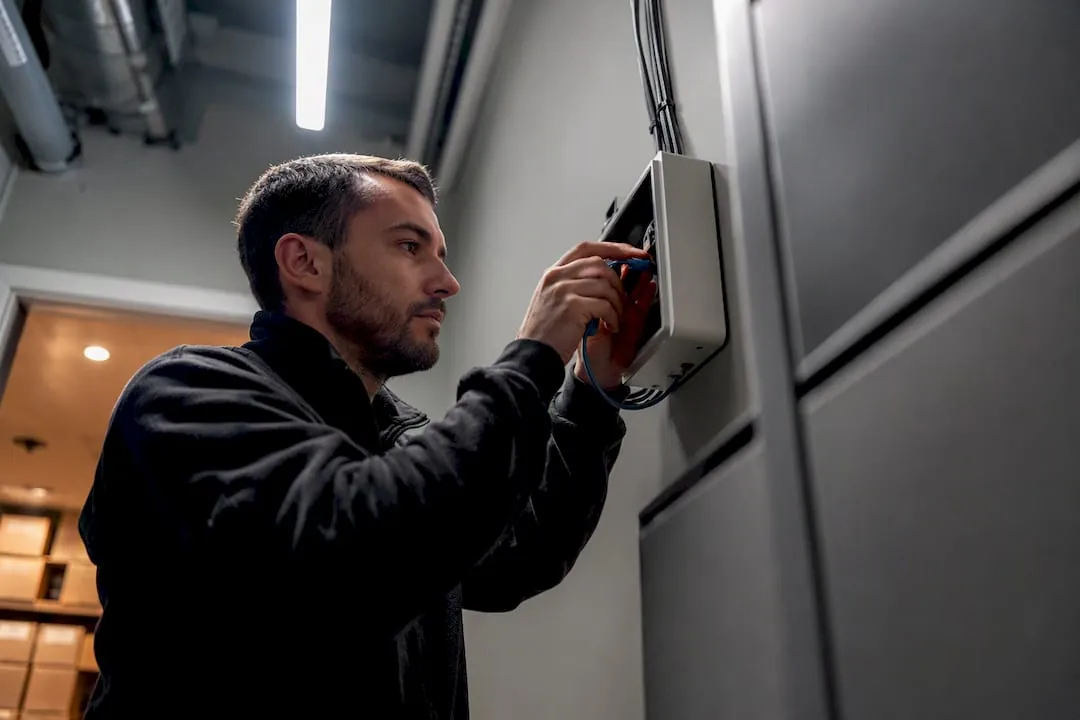
A reliable parcel locker network comes down to six requirement categories: networking and connectivity, hardware and physical installation, software and integration, security and data handling, regulatory compliance, and ongoing operations. Before anything else, verify two things: whether the site has enough footfall and courier access to justify the install, and whether IT can open the specific network ports the hardware needs. Everything else in this checklist builds from those two answers.
TL;DR:
- Ensure the locker site has sufficient foot traffic and courier access before installation, and confirm IT can open required network ports like HTTPS and MQTT.
- Use outdoor enclosures rated IP65 or higher, with a backup power supply of at least 30 minutes for quick outages and proper ventilation for refrigerated units.
- Implement real-time APIs, atomic reservation, and integration with property management systems, while securing devices with TLS 1.2 or higher and unique certificates.
- Coordinate permits, ADA compliance, and USPS requirements early, involving local authorities and the postmaster to avoid delays and unusable lockers.
- Focus on smaller, well-placed locker banks with courier access over larger, poorly accessible configurations, and plan for scalability with modular hardware and standardized APIs.
Table of Contents
- What Should Be on Your Package Locker Requirements Checklist?
- What Network Ports and Protocols Do Package Lockers Need?
- What Hardware and Installation Specs Matter Most?
- What Software and Integration Capabilities Are Required?
- What Security and Privacy Controls Should You Require?
- How Do You Set SLAs and Maintenance Schedules?
- What Permits and Compliance Steps Does Installation Require?
- How Many Lockers and Compartment Sizes Do You Actually Need?
- What Do Deployment Teams Wish They Knew Beforehand?
- User Experience Requirements Beyond the Interface
- Power and Environmental Requirements Planners Overlook
- Planning for Scalability and Future Expansion
- Emergency and Fault Handling: What Happens When Something Breaks?
- Our Take: Stop Treating This as a Hardware Purchase
- Ready to Deploy? Here’s Where Luxer One Lockers Fit
- Sources
What Should Be on Your Package Locker Requirements Checklist?
Procurement teams pasting this into an RFP need priority tags, not just categories. Here’s the short version, with must items non-negotiable, should items strongly recommended, and optional items situational.
- Networking (must): Port 443/HTTPS reachable, MQTT allowlisted, without SSL packet inspection on device traffic.
- Hardware (must): IP65+ enclosure for outdoor units, UPS runtime of a half hour or more.
- Software (must): Real-time availability API, atomic slot reservation, PMS/OMS integration hooks.
- Security (must): TLS 1.2 or higher, unique device certificates, signed firmware updates.
- Regulatory (must): ADA clearance review, USPS STD-4C compliance for mailroom units.
- Operations (should): Documented SLA with uptime and mean time to repair (MTTR) targets, remote diagnostics access.
- Procurement flags (should): Confirm warranty length, spare-parts lead time, and whether the vendor offers 24/7 remote support versus business-hours only.
Missing any “must” item at contract signing tends to surface as a change order later, usually the expensive kind.
What Network Ports and Protocols Do Package Lockers Need?
Locker hardware is essentially a fleet of purpose-built IoT terminals, and IT teams should treat it that way when configuring firewalls. Vendor documentation for locker systems typically lists a specific set of required hostnames and ports rather than a general “allow internet access” rule, and getting this wrong is the single most common cause of a locker bank going dark on installation day.
Expect to allowlist these at minimum:
- HTTPS (TCP 443): Primary API and firmware communication channel.
- MQTT (8883): Telemetry and real-time status messaging, often TLS-wrapped.
- NTP (123): Time synchronization, critical for certificate validation and log accuracy.
- DNS (53): Hostname resolution for vendor cloud endpoints.
- Remote support ports (commonly 5938 for tools like TeamViewer): Needed for vendor-side diagnostics.
Vendor network documentation consistently warns against SSL packet inspection or web filtering that rewrites TLS handshakes, since that breaks device authentication outright. Allowlist by hostname where the vendor provides one, not just by port.
Because lockers function as edge IoT devices, they need local caching so a delivery can still be logged and a compartment still assigned during a network outage. Reservation logic has to be atomic. Two couriers should never be able to claim the same compartment because the cloud state and the local cache disagreed for a few seconds. Retry and backoff logic on reconnect matters more than raw bandwidth. A locker on a spotty cellular fallback that gracefully queues and syncs beats one on fast Wi-Fi with no offline handling. For planning purposes, treat sub-100 millisecond API latency on availability queries as the benchmark for a responsive courier and resident experience.
Pro Tip: Run a 48-hour cellular failover test before go-live, not after. A locker that silently drops to offline mode without alerting anyone can sit undetected for days in a low-traffic mail room.
Wired connectivity should be primary, with LTE or 5G cellular as automatic fallback, and a site-to-site VPN option for properties with sensitive PMS networks. Monitor packet loss, round-trip latency, and connection uptime per device, not just per site.
What Hardware and Installation Specs Matter Most?
Physical installation mistakes are expensive to fix after concrete is poured, so get environmental and power specs locked before the crew shows up, and consider sourcing from commercial EV chargers designed for networked outdoor deployments when planning power provisioning for large properties. Outdoor units need an enclosure rated IP65 or higher, with tamper detection and a battery backup sized for 30 to 60 minutes of runtime during short outages. Refrigerated lockers add another layer: confirm compressor ventilation clearance and a dedicated circuit sized for continuous compressor load, not just peak draw.
Key hardware checklist items:
- Enclosure rating: IP65 minimum for any unit exposed to rain, dust, or direct sun.
- Backup power: 30 to 60 minute UPS runtime, longer for refrigerated units.
- Mounting: Confirm rough-opening dimensions against the vendor spec sheet before framing; freestanding units need a reinforced pad, wall-mounted units need verified stud or masonry anchoring.
- Access clearance: A carrier unloading zone with parking or curb access within a short walking distance of the bank.
- Climate protection: Shade or an overhang for outdoor units in high-heat climates to protect touchscreen electronics.
For mailroom lockers subject to USPS delivery, USPS STD-4C governs compartment dimensions, mounting height, and clearance, and installation should be coordinated with the local postmaster, who typically supplies the master carrier lock. Skipping that coordination step is a common reason USPS-served lockers sit unusable for weeks after installation. Details on siting outdoor units correctly are covered in our outdoor installation guide.
What Software and Integration Capabilities Are Required?
The software layer is where a locker network either feels invisible to residents or becomes a support ticket generator. At minimum, the vendor’s API needs to expose a live availability query, an atomic reservation call, telemetry reporting, remote-open commands for admin use, and a firmware update endpoint that can push patches fleet-wide without a site visit.
Integration touchpoints to map out early:
- Property management system (PMS): Resident lookup, unit matching, and move-out triggers that clear locker access.
- Order management or logistics systems (OMS): For properties routing e-commerce or courier deliveries through locker discovery flows.
- Notification channels: SMS, email, and app push, since residents will not all check the same channel.
- Admin authentication: OAuth or SAML for staff-facing dashboards, paired with X.509 device certificates so each physical unit has a verifiable identity separate from user credentials.
Target API latency under 100 milliseconds for availability checks, since anything slower shows up immediately as a laggy kiosk screen during peak delivery hours.
What Security and Privacy Controls Should You Require?
Security minimums for locker networks should mirror any other internet-connected access control system, not get treated as an afterthought because the hardware sits in a lobby. Require TLS 1.2 or 1.3 for all device communication, a unique X.509 certificate per device for identity verification, and digitally signed firmware so a compromised update can’t push unsigned code to the fleet. Role-based access control should separate what a courier can do (open assigned compartments) from what an administrator can do (override, audit, reconfigure).
- Encryption: TLS 1.2/1.3 minimum, no exceptions for internal network segments.
- Device identity: Unique X.509 certificate per unit, rotated on a defined schedule.
- Firmware integrity: Signed updates only, with rollback capability.
- Audit logging: Every pickup, unlock, and admin action logged with timestamp and actor ID.
- Log retention: Keep at minimum 12 months of audit history, encrypted at rest.
By the numbers: Vendor documentation for locker platforms flags SSL packet inspection as a leading cause of device authentication failures, which is why security teams are advised to allowlist device hostnames outright rather than route locker traffic through standard corporate TLS-inspecting proxies.
On privacy, minimize personally identifiable information stored on-device, require explicit opt-in for SMS or email notifications, and confirm the vendor’s data-processing terms address retention limits and breach notification timelines before signing.
How Do You Set SLAs and Maintenance Schedules?
Uptime targets only matter if someone is watching the right signals. Telemetry should track heartbeat status, door open/close events, battery charge level, internal temperature (critical for refrigerated units), and firmware error codes, with alert thresholds tight enough to catch a failing unit before a resident notices.
- Set the SLA first. Aim for defined uptime percentage and a maximum mean time to repair (MTTR), written into the vendor contract, not assumed.
- Grant remote access deliberately. Allow vendor remote debugging or session tools like TeamViewer under a documented approval process, not blanket standing access.
- Run daily pickup checks. Confirm compartments cycle correctly and jammed doors get flagged same-day.
- Schedule monthly mechanical inspection. Hinges, locking mechanisms, and touchscreens wear faster than most planners expect.
- Patch firmware quarterly, or immediately for security-critical releases.
Pro Tip: Correlate device heartbeat data with per-location utilization metrics. A unit with rising error rates at a high-traffic property should jump the maintenance queue ahead of a quiet one, even if both technically meet the alert threshold. Operational workflows for staff are covered in more detail in our package management guide.
What Permits and Compliance Steps Does Installation Require?
Permitting gets overlooked until it delays a launch date, so build it into the timeline from day one, not after equipment arrives on-site. Most installations require some combination of building, electrical, and, for anything on public sidewalks or shared common areas, right-of-way permits, and local building departments should be consulted before ordering hardware.
- Building and electrical permits: Required in most jurisdictions for any hardwired power connection.
- Right-of-way review: Needed if the locker bank sits on a public sidewalk or shared easement.
- ADA accessibility review: Compartment height, reach range, and clear floor space must meet ADA accessibility standards, and this should be checked against local codes too, since some jurisdictions layer additional requirements on top.
- USPS coordination: For mailroom units under USPS STD-4C, confirm who supplies the master carrier lock and schedule postmaster sign-off before install day.
- Carrier access procedures: Document how UPS, FedEx, and USPS drivers each access the bank, since procedures differ by carrier.
How Many Lockers and Compartment Sizes Do You Actually Need?
Sizing a locker bank by guesswork is the fastest way to either overbuild the budget or underbuild capacity within a year. Start with unit count and average package volume per unit, then apply a utilization assumption and dwell-time estimate. Properties running high delivery volume with same-day pickup habits need fewer compartments per unit than properties where residents let packages sit for days.
- Compartment mix: A blend weighted toward small and medium compartments generally outperforms an even split, since most e-commerce packages skew small.
- Site selection factors: Prioritize footfall, 24/7 access, courier parking, lighting, and camera coverage over simply finding available square footage.
- Courier access over locker count: Industry planning guidance consistently favors a well-placed smaller bank with easy courier unloading over a larger bank buried in a hard-to-reach corner.
- Post-launch KPIs: Track utilization rate, average dwell time, pickup latency, and failed-delivery rate, and revisit compartment mix if any metric drifts for more than a billing cycle.
What Do Deployment Teams Wish They Knew Beforehand?
Site prep catches most first-time planners off guard in the same handful of places. Confirm the rough opening against the vendor’s exact spec sheet, not a rounded estimate, and verify power phase and breaker labeling on-site before the electrician leaves, since mislabeled panels cause the majority of post-install service calls.
- Test cellular fallback on-site, not in a lab, since building materials and carrier signal strength vary block to block.
- Frame cameras before drywall goes up, since retrofitting camera angles after finish work is expensive.
- Confirm signage placement matches where residents will naturally look, usually eye level near the entry point, not above it.
- Watch unloading space. Insufficient room for a courier hand truck is the most common post-install complaint from facilities teams.
- Check refrigerated unit ventilation before enclosing the space; compressors need airflow clearance the spec sheet will state explicitly.
User Experience Requirements Beyond the Interface
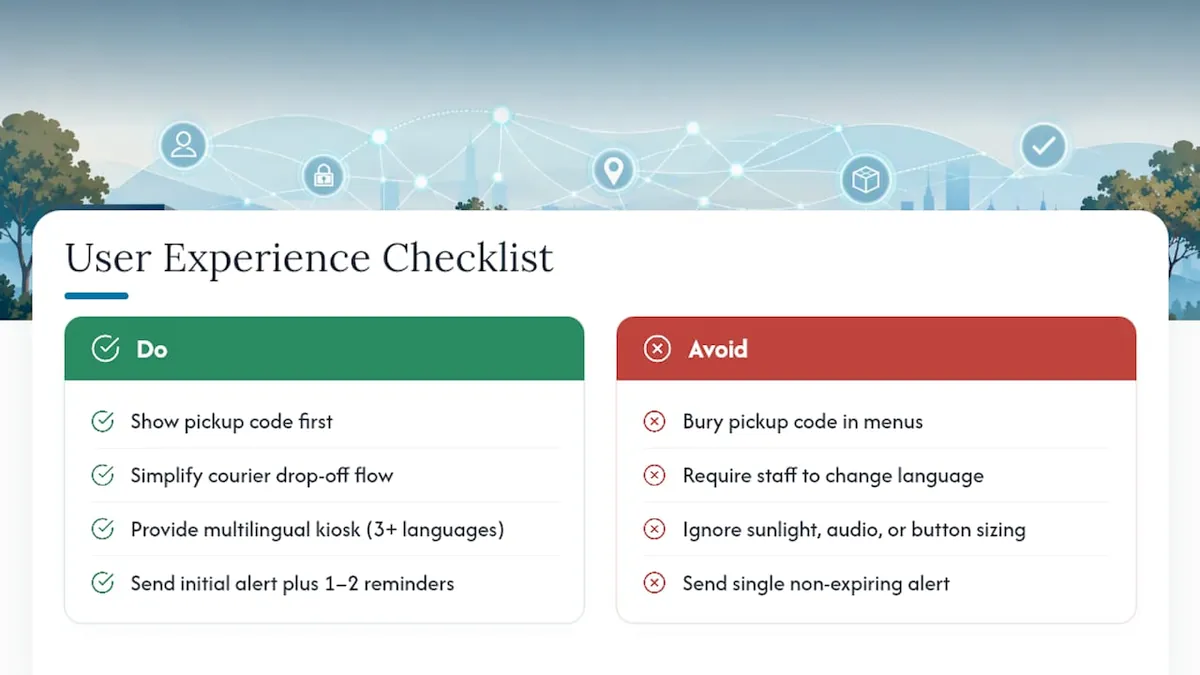
A locker network succeeds or fails on whether residents and couriers can operate it without a phone call to the office. The touchscreen interface needs a clear hierarchy: pickup code entry should be the first thing a resident sees, not buried behind a menu of options they will never use. Courier drop-off flows need to be even simpler, since drivers are optimizing for speed, not exploring a UI.
Multilingual support isn’t optional for most multifamily properties. Spanish is the obvious baseline in much of the country, but properties with international student populations or diverse workforce housing often need three or more languages available at the kiosk level, selectable without staff assistance.
Accessibility extends past the ADA’s physical clearance rules into interaction design. Screen brightness and contrast need to hold up in direct sunlight for outdoor units. Audio cues help residents with visual impairments confirm a successful unlock. Button sizing on touchscreens should account for users wearing gloves in cold climates, a detail that gets missed constantly in southern-market product testing that never accounts for northern deployments.
Notification design matters just as much as the kiosk itself. A resident who receives a pickup alert with no expiration warning and no second reminder is a resident who lets a package sit for a week and then complains to the property manager. Build in a reminder cadence, typically an initial alert plus one or two follow-ups before any dwell-time escalation, so the locker system does some of the customer service work automatically.
Power and Environmental Requirements Planners Overlook
Energy consumption for standard ambient lockers is modest, dominated by the touchscreen, LED indicators, and lock actuators rather than any heavy draw. Refrigerated units change that math entirely. A compressor running continuously in a hot climate draws meaningfully more power than an ambient bank of the same footprint, and that needs its own dedicated circuit sized for continuous, not intermittent, load.
Backup power duration should match the failure mode you’re actually protecting against. A 30 to 60 minute UPS runtime covers the vast majority of short outages and grid blips. Properties in storm-prone regions or areas with a history of multi-hour outages should budget for extended battery packs or a generator transfer switch, particularly for refrigerated units where a warm compartment means spoiled groceries and an angry resident within hours, not days.
Climate control considerations run in both directions. Outdoor units in high-heat climates need shade structures or ventilated enclosures to keep internal electronics within their rated operating temperature, since touchscreens and processors degrade faster when they’re baking in direct sun for eight hours a day. Cold-climate installations need to consider condensation inside the enclosure and whether lock mechanisms will still cycle reliably below freezing. A year-round performance review of an outdoor deployment usually surfaces these seasonal failure points long before a spec sheet does.
Planning for Scalability and Future Expansion
The locker bank a property installs this year rarely matches what it needs in three years, so modular design should be a procurement requirement, not a nice-to-have. That means physically expandable compartment banks that bolt onto an existing installation without ripping out the original unit, and software that can onboard new hardware without a platform migration.
Interoperability standards matter more as portfolios grow. A property management company running fifteen properties does not want fifteen different locker platforms with fifteen different admin logins and fifteen different API integrations into the same PMS. Standardized APIs and shared authentication patterns across a portfolio cut the operational overhead of managing a multi-site rollout by a wide margin, even without a specific efficiency figure attached to it.
Plan the network architecture with headroom from the start. A site wired for double its current compartment count costs marginally more upfront and saves a full re-trenching project later. The same logic applies to cellular data plans and API rate limits. Negotiate contract terms that scale with unit count rather than locking into a fixed ceiling that forces a renegotiation the moment the property adds a second building.
Emergency and Fault Handling: What Happens When Something Breaks?
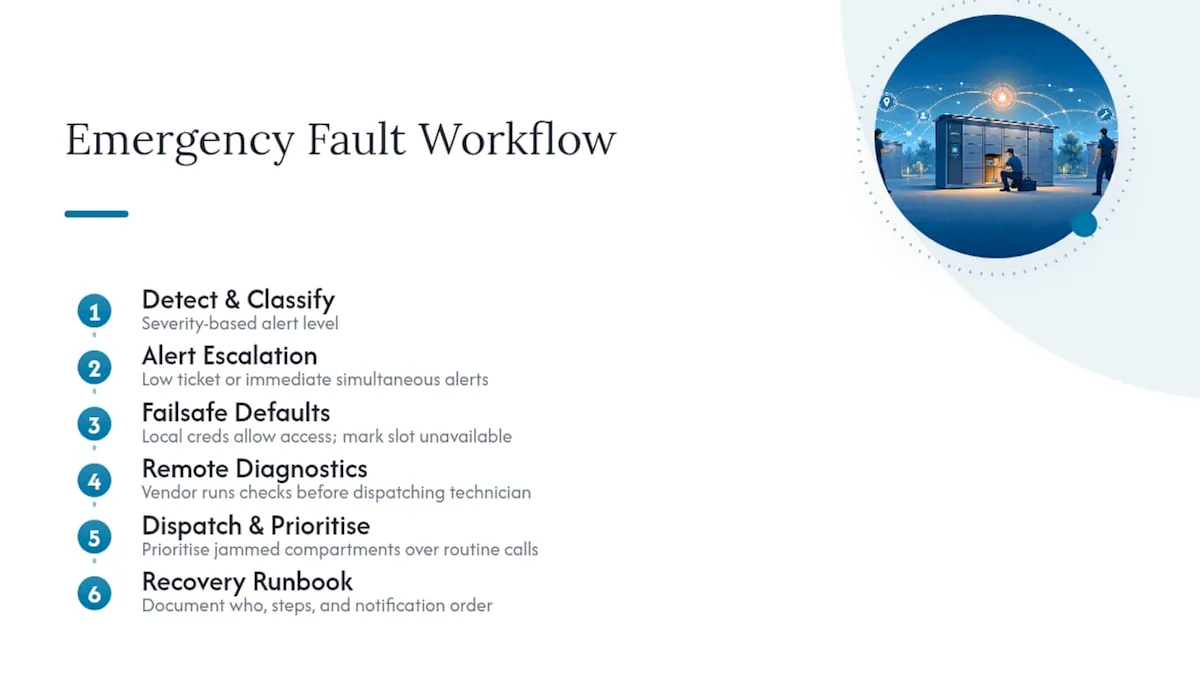
Every locker network eventually faces a jammed door, a power failure, or a firmware crash mid-update, and the difference between a minor incident and a resident complaint spiral is whether the failsafe modes were designed in advance.
Alert design should escalate proportionally to severity. A single failed compartment sends a low-priority ticket to the maintenance queue. A full bank going offline, or a refrigerated unit’s temperature drifting out of range, should trigger an immediate alert to on-site staff and the vendor’s remote support line simultaneously, not a ticket that sits until morning.
Failsafe modes need to default toward safety and access, not lockout. If the network connection drops, the system should rely on locally cached credentials to let couriers complete drop-offs already reserved, rather than freezing the entire bank until connectivity restores. If a specific compartment jams, the unit should be able to mark that slot unavailable automatically rather than continuing to assign packages to a door that will not open.
Recovery processes matter as much as the alert itself. Document who gets notified first, what remote diagnostic steps the vendor’s support team runs before dispatching a technician, and how a jammed compartment gets prioritized against a routine service call. A property with a documented recovery runbook typically resolves incidents in a fraction of the time of one improvising each event fresh, simply because nobody is guessing who to call.
Our Take: Stop Treating This as a Hardware Purchase
The biggest mistake stakeholders make is scoping a locker network like a hardware purchase order instead of an IoT deployment with a compliance layer attached. Ports, device certificates, and offline caching logic deserve the same planning rigor as the physical box. A locker bank with perfect enclosure ratings and a broken allowlist is just an expensive paperweight until IT opens the right ports.
The conventional advice to “maximize locker count” is often backwards. A smaller, well-placed bank with real courier access beats a bigger one crammed into a corner nobody can reach with a hand truck. That’s not a hardware problem. It’s a site-selection problem, and it gets solved on paper before a single bracket goes into a wall.
If you’re prioritizing one thing first, prioritize the ADA and USPS review alongside the network allowlist, in parallel, not sequentially. Too many projects treat permitting as a formality to handle after the technical spec is locked, and that’s exactly the order that produces expensive rework. Technical readiness and regulatory readiness should hit the procurement table on the same day.
Ready to Deploy? Here’s Where Luxer One Lockers Fit
Everything in this checklist gets easier when the vendor has already solved the hard parts. Luxer One builds its indoor, outdoor, and refrigerated systems around the exact requirements covered here: device-level security, offline-capable hardware, and PMS integration that doesn’t require a custom build for every property.
If your project involves outdoor exposure, the weatherproof outdoor lockers are built for the IP65-and-up enclosure standard multifamily properties need in most climates. Properties handling grocery and meal-kit volume should look at the refrigerated locker options, since compressor sizing and ventilation are baked into the installation plan rather than left for the property to figure out. For properties that want the compliance and operations burden handled entirely, the package room management service puts daily monitoring, telemetry review, and maintenance scheduling on our side of the ledger instead of yours.
Installation and support services can help ensure ADA review, USPS coordination, and network configuration are handled by experienced teams. Start by requesting a site assessment through our team to see which configuration fits your property’s compartment mix and courier access constraints.
Sources
- Networking requirements for the Intelligent Locker AM Series
- Amazon Locker system design: step-by-step guide
- 10 questions to ask before setting up a parcel locker network for your business
- ADA (U.S. Department of Justice) official site
Recommended
Ready for a Luxer One® package locker quote?
Tell us your unit count and we'll send right-sized pricing with a fast response time.
Get my free quote