August 24, 2026
Cellular Connected Lockers: A Buyer's Guide for IT Teams
Discover the advantages of cellular connected lockers for IT teams, enhancing remote management and ensuring reliable operation without Wi-Fi hassles.
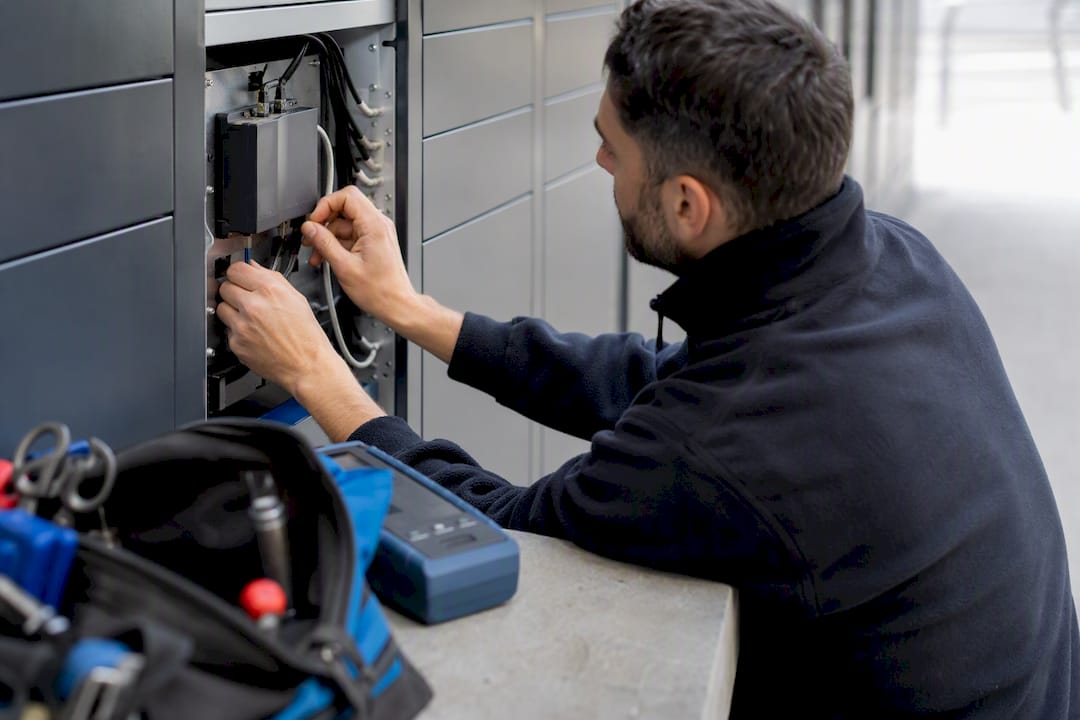
For facility and IT teams, cellular connected lockers built around a dedicated modem, a cloud management platform, and a local offline cache are the most reliable way to run remotely managed pickup infrastructure. That architecture keeps locker operations off your corporate Wi‑Fi, gives you a continuous audit trail from install day forward, and lets you manage every site from one dashboard instead of driving to each property to reset a jammed compartment.
The case for cellular over Wi‑Fi or Ethernet comes down to a short list of practical wins:
- Remote management from anywhere, without a truck roll for routine fixes
- Independence from site Wi‑Fi outages, password rotations, or IT firewall changes
- An unbroken audit trail even when a location temporarily loses signal
- Simpler carrier integration than juggling dozens of property-specific networks
Before signing anything, procurement should demand three things up front: a clear SIM management plan, documented battery backup specs, and open API access for your existing systems.
Key Takeaways
Cellular connected lockers work best when a dedicated modem, cloud platform, and local offline cache operate together, not as separate bolted-on features.
| Point | Details |
|---|---|
| Choose dedicated cellular | A separate modem or gateway keeps locker traffic off site Wi‑Fi and isolated from your IT network. |
| Demand offline behavior | Require queued events and cached credentials so pickups still work during a signal outage. |
| Plan SIM strategy early | Ask about eSIM support and carrier redundancy before signing, not after installation. |
| Pilot before scaling | Test signal strength, uptime, and staff time savings at one site before a portfolio rollout. |
| Locker Solutions fits the architecture | Offers indoor, outdoor, and refrigerated lockers with nationwide installation and maintenance support. |
Table of Contents
- How Cellular Connectivity Powers Smart Lockers
- What to Look for in Locker Hardware, Gateways, and Software
- How Secure Are Cellular Locker Access Logs?
- Where Do Cellular Lockers Work Best?
- How Do You Pilot a Cellular Locker Rollout?
- What Does Locker Solutions Offer for Cellular Deployments?
- What the Industry Gets Wrong About Cellular Lockers
- Ready to Evaluate a Cellular Locker System for Your Property?
- Frequently Asked Questions
- Sources
How Cellular Connectivity Powers Smart Lockers
A cellular connected locker system works because the locker hardware talks to a dedicated modem or gateway that has its own connection to a mobile network, completely separate from your building’s internet. That separation matters more than most IT teams initially assume.
Site Wi‑Fi goes down. Property management companies change passwords. Guest networks get segmented for security reasons that have nothing to do with package lockers. A dedicated cellular link sidesteps all of it. Many locker platforms use their own gateway to aggregate events from individual compartments and push them out over a dedicated cellular connection, which keeps locker traffic isolated from the customer’s LAN entirely.
On the network side, most locker vendors lean toward IoT-grade cellular standards like LTE‑M or Cat‑1 rather than full consumer 4G or 5G modems. These lower-power protocols were built for exactly this kind of telemetry: small, frequent data packets (a door open event, a temperature reading, a battery status ping) rather than video streaming. That tradeoff extends battery life and keeps the connection stable in basements and loading docks where signal is often weakest.
The data flow itself is straightforward: a compartment event triggers a message to the gateway, which relays it to the cloud platform in seconds, not minutes. Microsoft’s IoT Signals research points to reliable connectivity and consistent telemetry as the backbone of any functioning IoT deployment, and lockers are no exception.
What happens when the connection drops? A well-built system queues events locally and caches recent credentials, so a resident or courier can still open a compartment during a short outage. The event syncs to the cloud the moment the connection returns.
What to Look for in Locker Hardware, Gateways, and Software
Evaluating a cellular locker system means scoring four categories, not just picking a locker that looks nice in a lobby.
- Locker hardware and form factor. Decide whether you need indoor units, weatherproof outdoor kiosks, refrigerated compartments for perishables, or a mix. Compartment sizing matters more than people expect. A property receiving mostly small parcels needs different bay ratios than one seeing bulk grocery and meal-kit deliveries.
- Connectivity module and SIM strategy. Ask whether the vendor supports eSIM provisioning or requires physical SIM swaps, and whether the plan includes carrier redundancy. A single-carrier deployment is a single point of failure; IoT deployments increasingly favor multi-carrier or eSIM setups specifically to avoid that risk.
- Cloud management platform. Look for real-time monitoring, role-based admin access, exportable audit logs, and open APIs for integration with your property management system. A platform without API access will eventually force you into manual data entry somewhere.
- Power resilience. Confirm battery life under normal use, what happens during an extended mains outage, and whether the system pushes proactive maintenance alerts before a battery actually fails.
Pro Tip: Ask every vendor to walk you through what happens, step by step, during a 24-hour power and connectivity outage at once. Their answer tells you more about deployment maturity than any spec sheet.
Modular locker platforms have converged on integrated LTE modules for exactly this reason. Vendor technical documentation increasingly treats built-in LTE connectivity as a baseline expectation rather than a premium add-on, and that shift should shape your RFP language.
How Secure Are Cellular Locker Access Logs?
Security in a cellular locker deployment splits into two separate questions: how people get in, and how the network itself stays protected.
Most systems today support a mix of PIN codes, one-time passcodes, mobile app credentials, QR codes, and RFID badges. Each has different implications for admin visibility. PIN and OTP methods are easy for residents but generate weaker identity assurance than an app login tied to a specific account. Vendor buyer guides consistently list multiple access modes alongside a centralized audit trail as a baseline expectation, not a premium feature.
On the network side, insist on TLS encryption for all device-to-cloud traffic, a secure tunnel or VPN for gateway communication, and certificate-based device authentication rather than shared credentials. This is where cellular connectivity actually helps your security posture: because the locker traffic never touches your corporate network, a compromised locker can’t become a pivot point into your IT infrastructure the way a Wi‑Fi-connected device sometimes can.
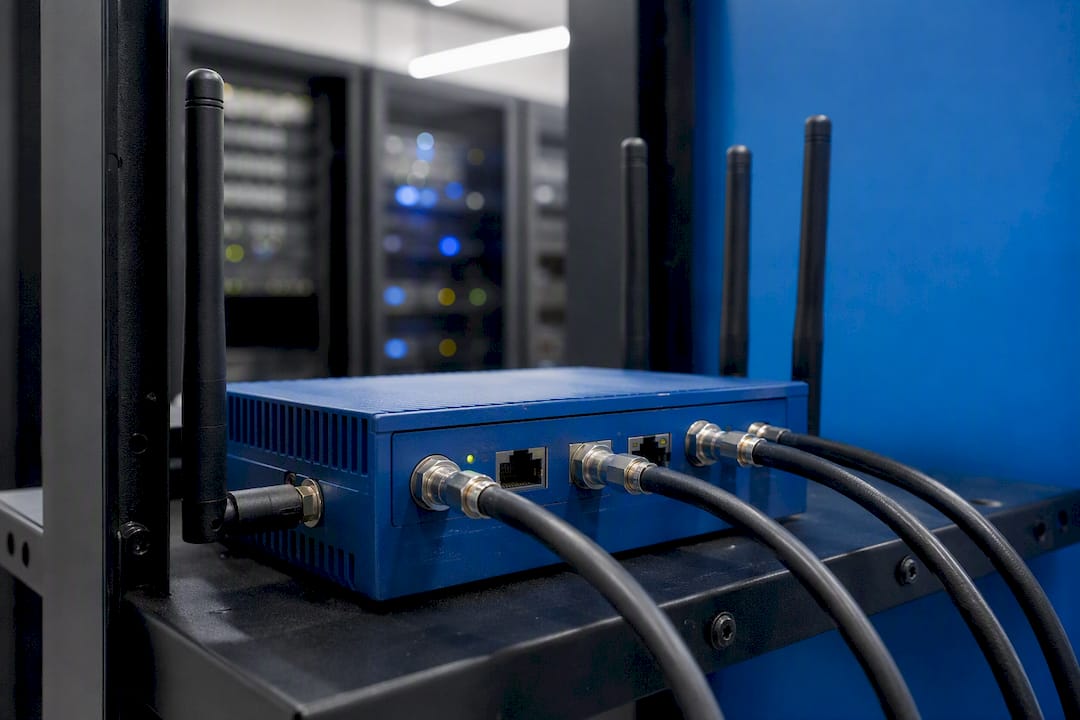
Forrester’s total economic impact research on Microsoft Entra makes a broader point that applies directly here: identity-led device management measurably reduces operational friction for organizations managing large fleets of cloud-connected devices. Treat your locker network the same way you’d treat any other operational technology domain, not as an afterthought bolted onto the guest Wi‑Fi.
Pro Tip: Ask vendors for a sample audit export before you sign. If timestamps, operator names, and event types aren’t cleanly exportable to CSV or PDF, dispute resolution with a resident or courier becomes a headache.
Where Do Cellular Lockers Work Best?
Requirements shift significantly depending on where the lockers sit, and matching features to environment prevents a lot of buyer’s remorse.
- Multifamily properties need resident-friendly interfaces, tight integration with the property management system, and enough compartment volume to survive a holiday delivery surge without backlog.
- Workplace and campus settings often add device charging bays and asset checkout tracking, and can sometimes tie into existing single sign-on systems for employee access.
- Logistics and carrier hubs care most about loading workflows, direct carrier integrations, and proof-of-delivery capture at the moment a package goes in.
- Outdoor and remote sites demand weatherproof housings, sometimes off-grid or solar-assisted power, refrigeration for perishables, and real signal testing before installation, not just a coverage map.
A refrigerated locker bank at an apartment complex and a rugged kiosk at a rural distribution yard are solving completely different problems, even though both run on the same underlying cellular architecture.
How Do You Pilot a Cellular Locker Rollout?
A pilot exists to answer one question honestly: does this system hold up under real conditions before you commit to a full property or portfolio rollout?
- Define success criteria upfront. Track average pickup time, failed delivery rate, staff hours saved on package handling, and system uptime over the pilot window.
- Run a real site survey. Test cellular signal strength at the exact install location, not just the leasing office, and confirm power access matches what the hardware requires.
- Check integration readiness. Confirm carrier delivery workflows, property management system syncing, admin training, and a clear service level agreement before go-live.
- Set scaling triggers. Decide in advance what uptime and adoption numbers justify moving from one pilot site to a multi-property rollout.
| Pilot Phase | What to Measure |
|---|---|
| Site survey | Signal strength, power access, physical clearance |
| — | Pickup time, failed delivery rate, uptime |
| — | Staff hours saved, resident adoption rate |
| Scale decision | Whether metrics meet pre-set rollout thresholds |
Most successful rollouts move from single-site pilot to portfolio scale within a few months, once the uptime and adoption numbers clear the bar set at the start.
What Does Locker Solutions Offer for Cellular Deployments?
Locker Solutions builds toward exactly the architecture this guide recommends: cellular connectivity, cloud management, and offline resilience working together instead of as separate afterthoughts.
- Indoor and outdoor electronic package lockers, including weatherproof kiosks for exposed sites
- Refrigerated compartments for perishable and grocery deliveries
- Automated package rooms for higher-volume properties
- Integrated alerts, video surveillance, and AI-powered label reading
- Nationwide installation with ongoing maintenance and support
A property that installs a refrigerated locker bank and an outdoor kiosk on the same cellular architecture gets one dashboard, one audit trail, and one support line instead of three separate systems to manage.
When you talk to Locker Solutions during procurement, ask specifically about warranty terms, SLA response times for maintenance calls, and whether they support a paid pilot phase before a full portfolio commitment. Their answers on those three points tell you more than any brochure will.
What the Industry Gets Wrong About Cellular Lockers
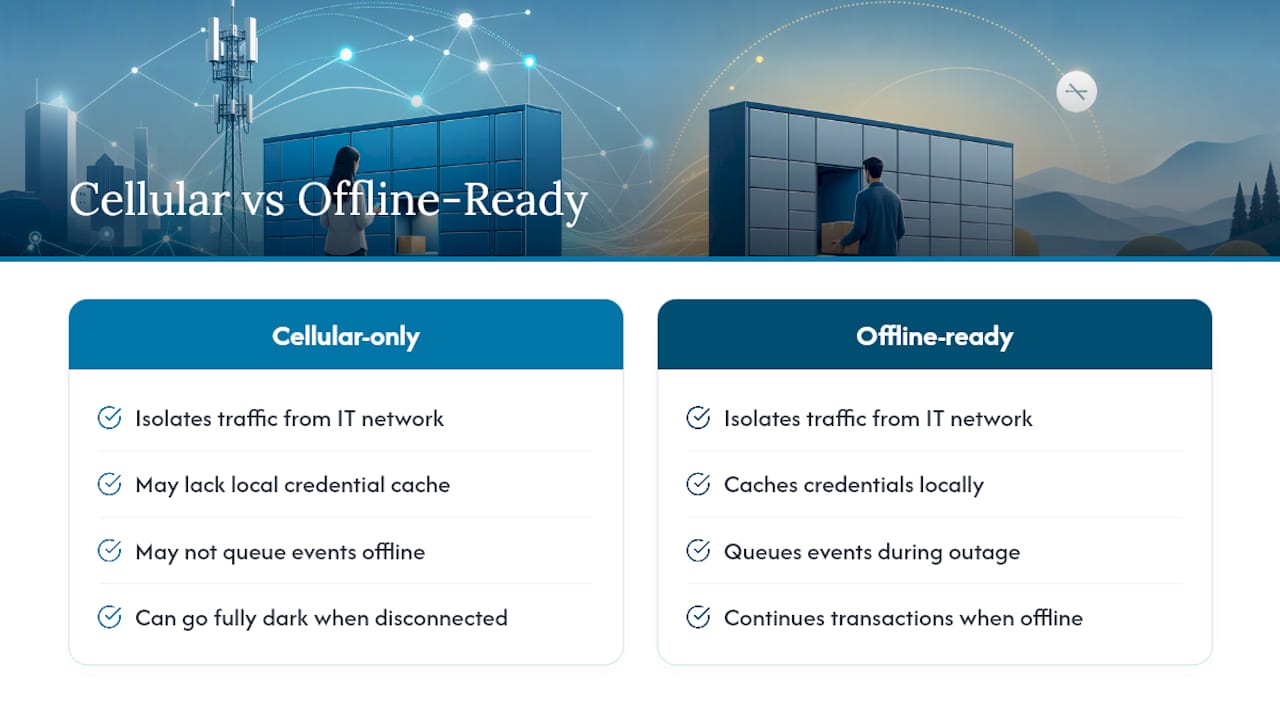
Most vendor pitches sell cellular connectivity as a convenience feature. That framing undersells what it actually does. The real value is architectural: cellular isolates locker traffic from a property’s IT network entirely, which is a security posture improvement, not just a deployment shortcut.
The conventional advice tends to stop at “get a locker with cellular backup.” That’s incomplete. What matters more is whether the system caches credentials locally and queues events during an outage, because a locker that goes fully dark the moment its connection drops is not meaningfully better than one wired to unreliable site Wi‑Fi. Offline-ready design is what actually protects resident and courier confidence when things go wrong, not the presence of a SIM card alone.
If you take one thing from procurement conversations, make it this: ask every vendor to prove offline behavior, not just describe it. Request a live demo where the connection is cut mid-transaction. How the system behaves in that moment tells you more than any spec sheet about whether it will hold up at 11 p.m. on a Friday when a resident is standing at a dark locker bank waiting for their groceries.
Ready to Evaluate a Cellular Locker System for Your Property?
If you’ve been comparing systems that rely on site Wi‑Fi or a single carrier connection, the gap shows up fastest during an outage: those setups go dark, cellular architecture with local caching keeps working. Locker Solutions builds every deployment, indoor, outdoor, or refrigerated, around that same dedicated cellular and offline-cache model, backed by nationwide installation and ongoing maintenance support.
A site survey is the fastest way to find out what your property actually needs: signal strength at the install location, power access, compartment sizing based on your delivery volume, and a realistic installation timeline. For properties dealing with heavy parcel volume or perishable deliveries, the refrigerated locker lineup and outdoor kiosk options cover most real-world scenarios without custom engineering. If your priority is tying lockers into resident access and unit entry systems, the Luxer Access platform handles that integration directly.
Request a site survey or a pilot quote through Locker Solutions and get a specific recommendation for your property’s layout, delivery volume, and connectivity conditions.
Frequently Asked Questions
What makes a locker “cellular connected” instead of just Wi‑Fi enabled? A cellular connected locker uses its own modem and mobile network connection instead of relying on the building’s internet, which means it keeps working even if site Wi‑Fi goes down or gets reconfigured.
Do cellular connected lockers need a strong signal to work reliably? They need adequate signal at the install location, which is why a site survey should always test actual signal strength at the planned locker position, not just a general coverage map for the address.
What happens if a cellular locker loses connection temporarily? A well-designed system caches recent credentials locally and queues events, so pickups can still happen during a short outage, with everything syncing to the cloud once the connection returns.
How long does a typical pilot-to-rollout timeline take? Most successful deployments move from a single-site pilot to broader portfolio rollout within one to two quarters, once uptime and adoption metrics clear the thresholds set before the pilot started.
Sources
- 6 findings from IoT Signals report (Microsoft blog)
Recommended
- Compact Locker Design for Urban Properties: A Property Manager’s Guide — Locker Solutions Blog
- Smart Lockers for Property Managers: 2026 Guide — Locker Solutions Blog
- Home Lockers for Apartments: A Property Manager’s Guide — Locker Solutions Blog
- Heat-Resistant Locker Technology: A Property Manager’s Guide — Locker Solutions Blog
Ready for a Luxer One® package locker quote?
Tell us your unit count and we'll send right-sized pricing with a fast response time.
Get my free quote